AI-native trip planning · works with your agent
Turn the reels you saved into a route you’ll actually take.
Astrail turns scattered travel inspiration into a real itinerary on a map, where every stop says where it came from. It speaks WebMCP, so an agent can plan and edit the trip with you, on the page you are looking at.



The tools live in the app, not on this page, which is just the pitch. Open Astrail in ChatGPT’s built-in browser and ask what you can do here. Fourteen tools answer once you are signed in, seventeen once a trip is open, and six on the sample trip linked above, which needs no account.
The story behind Astrail
Every trip starts as a pile of saved reels.
This is Aster, Astrail’s navigator. He hoards travel inspiration the way we all do: one glowing save at a time.
Chapter one · The pile
Saved is where trips go to sleep.
Every star in his pile is a saved reel: a café in Tokyo, a viewpoint you swore you’d get to. Saving feels like progress, but the pile only grows. Forty reels deep, still no plan. That look on his face is the moment you reopen your saved folder and don’t know where to start.

Chapter two · The rescue
Astrail is the machine that digs you out.
It’s the mech Aster pilots: a crew of AI agents that bursts through the backlog for you. Feed it the reels you saved. It reads every one, pulls out the real places, verifies them on the map, and keeps the receipts. What comes out the other side is your pile of stars, turned into a trip you can follow.

The two chapters above are illustrations. Everything past this point is the product itself, screenshotted rather than drawn.
How it works
You bring the reels and the taste. The agent does the clicking. You are both working the same map.
Step 1
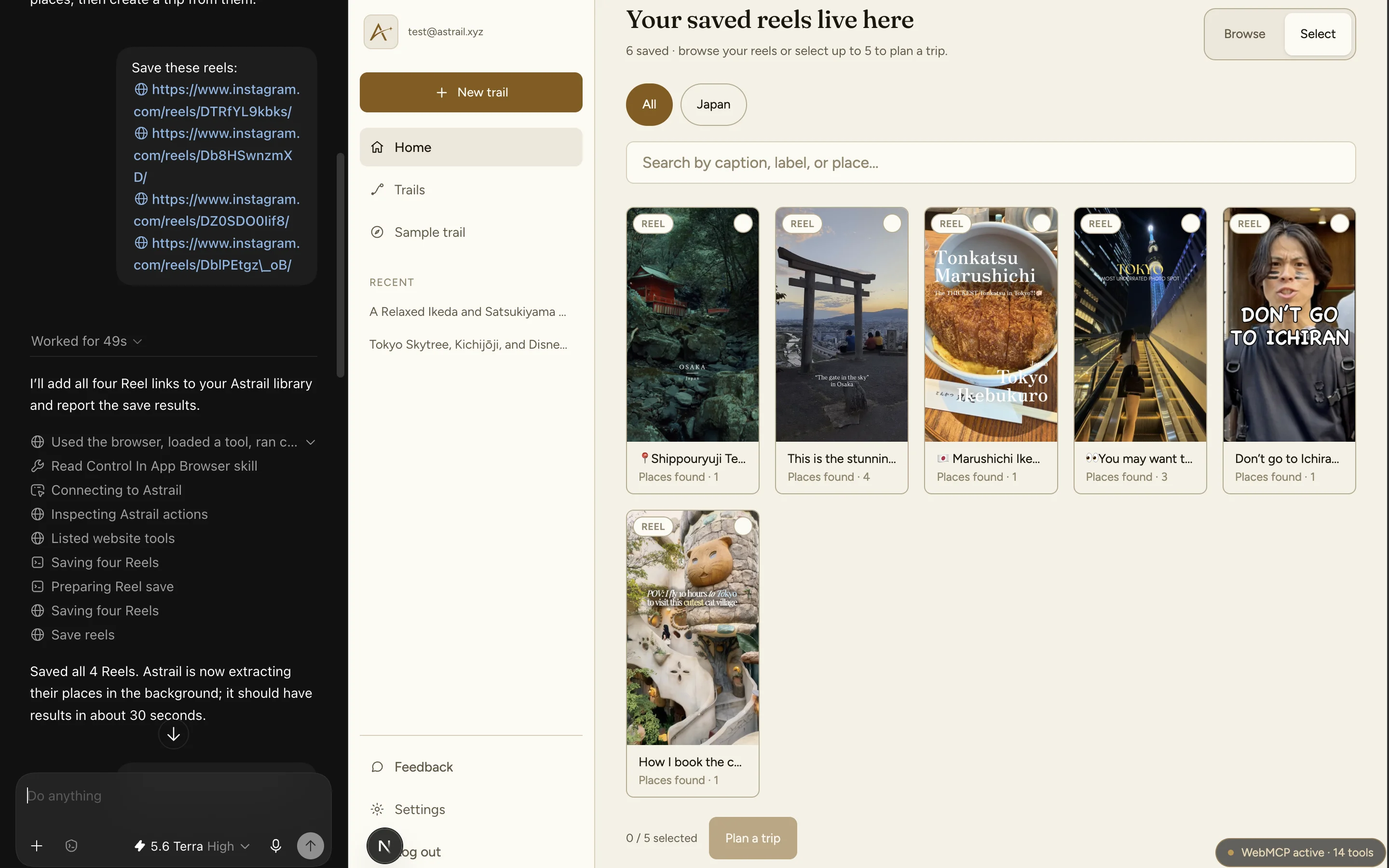
Hand it the reels
Paste 1 to 5 Instagram Reel links with your dates, budget and vibe, or open Astrail in ChatGPT and say “save these reels”. The agent saves through the same endpoint the form posts to, and starts the extraction the form makes you kick off separately, so the two paths are one feature rather than two.
Agentsave_reels · up to 5 at a time, non-Instagram links refused before any request

Step 2
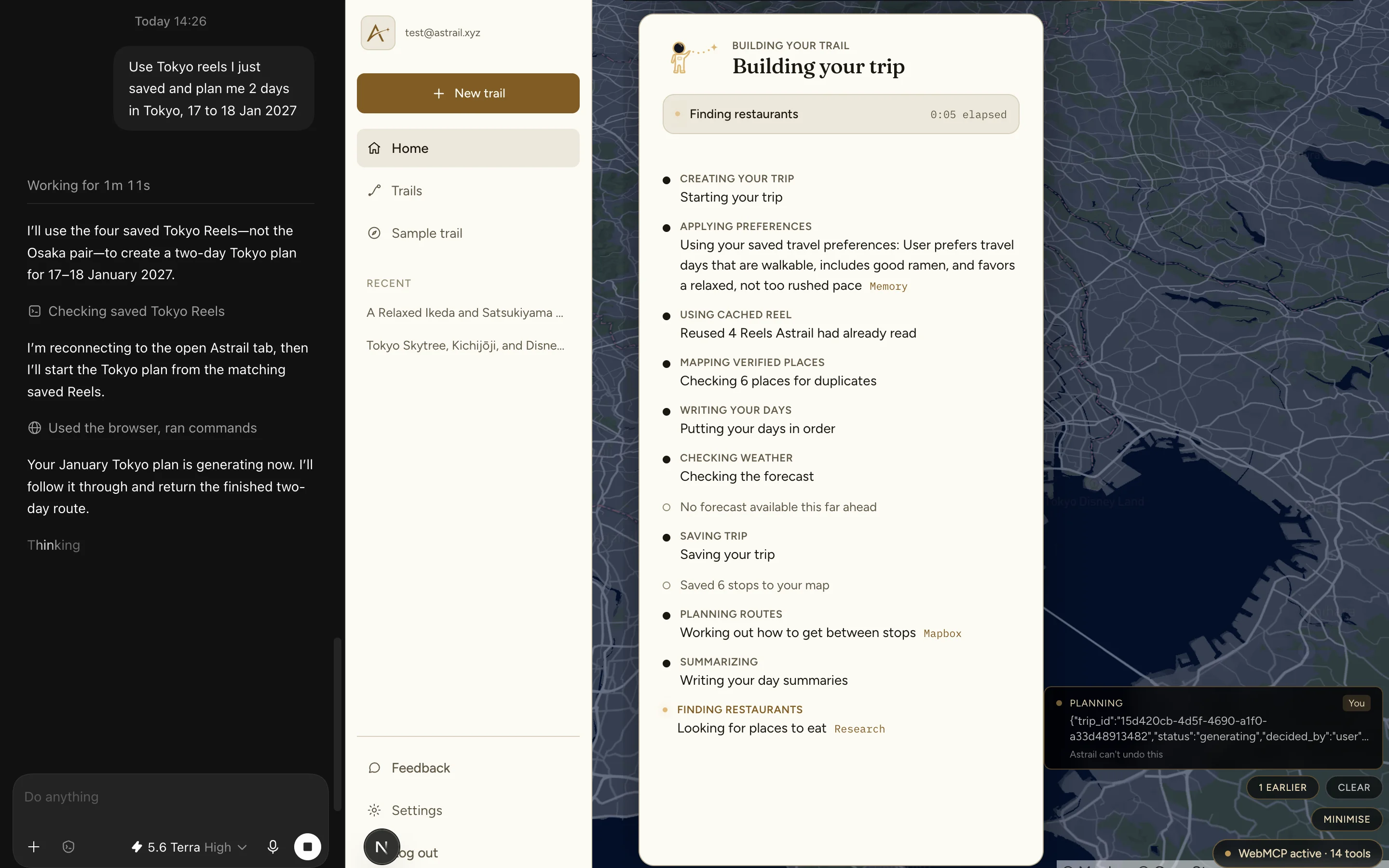
Follow the work as it happens
Astrail extracts every place, verifies it exists, and checks weather and routes. Ask the agent to start it and you get the run narrated as it goes: which stage it is on, what it kept, what it dropped, instead of one to three minutes of spinner.
Agentplan_trip_from_reels → get_trip_progress · approval on the page before anything is spent

Step 3
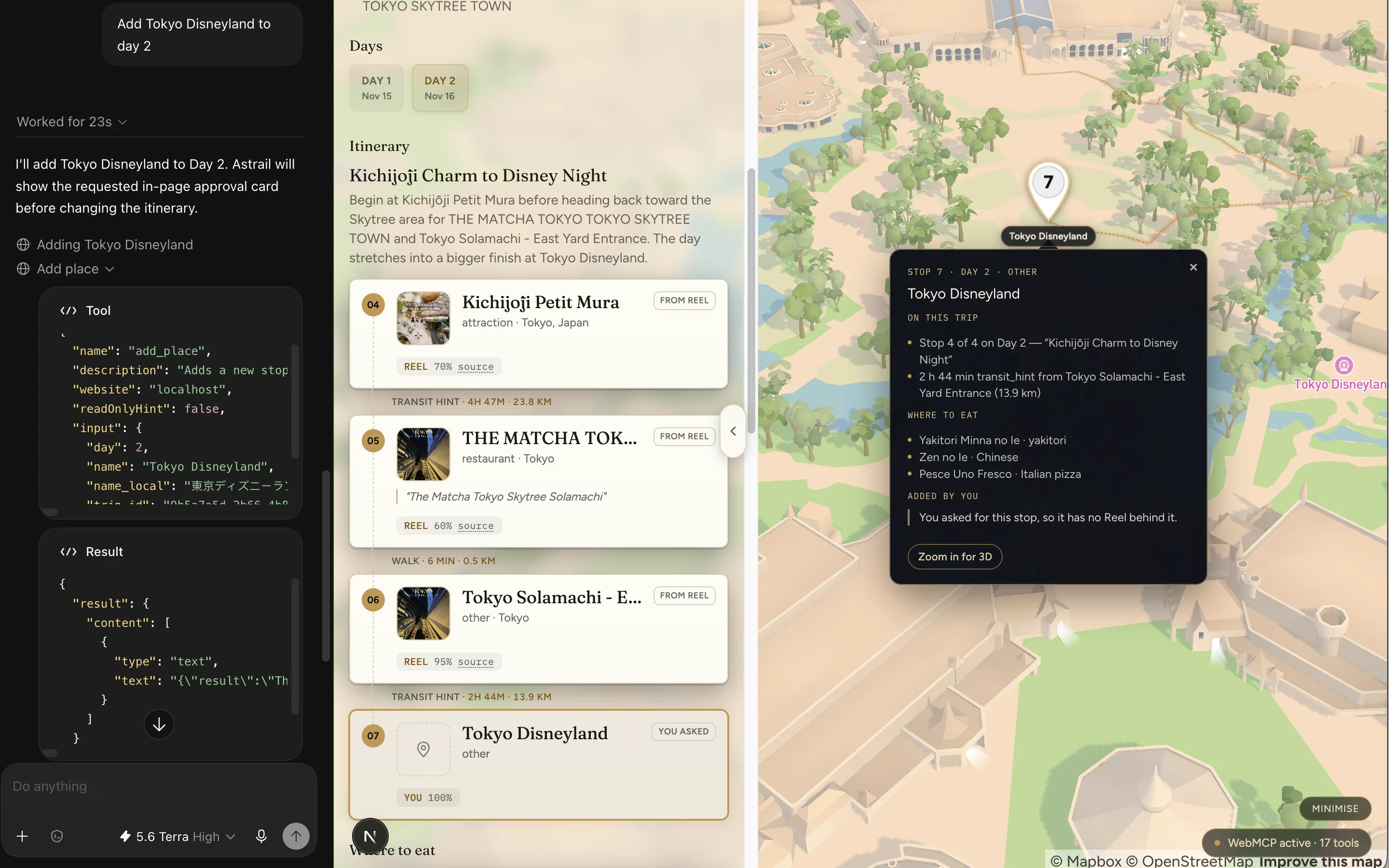
Change it by saying so
A day-by-day itinerary on a real map, with every stop traceable to the reel it came from, to Astrail’s own reasoning where it suggested one, or to you. Say “Add Tokyo Disneyland to day 2” and it finds the place, asks you on the page rather than in chat, and puts it on the map. The route redraws while you watch, and Astrail starts rewriting the day summaries itself in about half a minute, marked as updating while it runs. If that fails the activity rail says so, and the summaries stay behind until you ask again.
Agentmove_place · remove_place · add_place · set_trip_dates, each behind an approval card on the page, each starting the rewrite itself

Live demo · real map
Your itinerary comes back as a map you can move around.
This is the live map you’d get: a demo Tokyo trip, every stop numbered and connected. Your version adds the evidence panel, which carries the reel and the caption quote behind a stop that came from one, Astrail’s own reasoning behind a stop it suggested, and a plain note on a stop you asked for yourself.
Works with an agent
What the agent can do
Astrail speaks WebMCP, so an agent in your browser can read the planner you are signed into and act on it, through the same controls your own clicks use.
- 17 tools registered with
document.modelContext.registerTool(), 14 anywhere in the app and 3 more that appear only once a map exists to drive. get_app_stateanswers “what can I do here?”, the fix for the one thing testers kept saying, that they could not tell where to click.- It can read your saved Reels, your trips, any day's itinerary, and why a given stop is on it: the verbatim caption where the stop came from a Reel, Astrail's own reasoning where it suggested one, and a plain “you asked for this” where you did.
- It can also act: save Reels, start a generation that takes one to three minutes and narrate each stage, fly and tilt the live map, and move, remove, add or re-plan stops on a finished route.
- Every stop that came from a Reel carries that Reel's own cover frame in its pin, and links back to the Reel itself rather than to a scraped directory page.
- Planning a trip stops for approval on the page first, and so does every edit to a finished one, including the paid coordinate lookup behind a stop you asked for. Saving a Reel is the one action that spends without a card in front of it. It is bounded by a daily limit, and it skips a Reel whose places are already extracted.
- Where a fact does not exist, the space stays empty. No invented opening hours, no borrowed photographs, and no Reel cited for a stop that did not come from one.
Try it with an agent
- Open Astrail in the ChatGPT desktop app's built-in browser, not Safari or Chrome.
- Use GPT-5.6 Sol or Terra. Luna has WebMCP disabled.
- Turn on Settings > Browser > Permissions > Enable site tools.
- Look for the Site tools arrow in the address bar and the WebMCP chip at the bottom-right of the page, then ask “what can I do here?”
Questions
What people ask about Astrail.
- What is Astrail?
- A planner that turns saved Instagram Reels into a routed, evidence-backed itinerary. It speaks WebMCP, the layer that lets an agent operate that planner directly, reading the page you are signed into and acting on it, rather than you clicking through it alone.
- What can the agent actually do?
- Seventeen tools. It can tell you what is possible from where you are, read your saved Reels and any day of an itinerary, quote the caption a stop came from, say what Astrail remembers about how you travel, save new Reels, start a generation and narrate each stage as it runs, fly and tilt the map, and move, remove, add or re-plan stops on a finished route.
- Can it do things without asking me?
- Not the ones that matter. Planning a trip stops for approval on the page first, and so does every edit to a finished one, moving a stop included, because a move now costs a rewrite. The card names what is about to happen before it is sent: the dates, how many Reels, your own preferences quoted back word for word, and that it will spend one of your trips. It is a summary rather than the raw request: the links themselves, and details like budget and departure city, are not reprinted on it. The spending is named too: looking up the coordinates for a stop you asked for is a paid call, and it happens after you accept the card, not before. Exactly one action spends with no card in front of it. Saving a Reel starts extracting the places in it. That one is bounded by a daily limit, and it skips a Reel whose places it has already extracted, though a Reel that was saved but never made it through extraction is tried again. Reading is free and stays silent; a confirmation on every click would make the whole thing tiresome to use.
- What stops it inventing things?
- It picks from a list it cannot add to. Every place comes from a real geocoded record and the agent selects by index, so it has no way to emit a location that does not exist. Where a fact is simply absent, such as opening hours we cannot source or a photo nobody published, the space stays empty rather than being filled with something plausible.
- Why start from Reels?
- Because that is where most travel intent now starts. People save places months before they are ready to plan. Astrail starts from that messy pile of saves and turns it into a real trip, and every stop keeps a link back to the Reel it came from, not to a directory page that happens to mention it.
- Does it book hotels or flights?
- No, and in this build it does not even search. Astrail's hotel results came from Travala's travel MCP, which now refuses every call it used to answer, so hotel search is switched off and a trip you generate today comes back with no places to stay. The app hides that panel rather than showing you an empty one, and trips generated before the switch keep the hotels they already have. None of it was ever a booking: no payments, no booking step anywhere in the flow, and a price on a card was a search result, never an offer being held for you.

Your turn
Ask it what you can do here.
The tools are in the app, not this page. Open Astrail in ChatGPT’s built-in browser and the agent can read what you already have, save the Reels you paste, build the trip while narrating each stage, move a stop to another day, and fly the map to it. That last one runs through the very setters your own click runs, so its camera move and yours are the same event on the same map. The sample trail opens with no account. Moving, adding, removing or rescheduling a stop stops for a card on the page first.
An early build rather than a finished product, so expect rough edges.
17 tools · read · act · every stop says where it came from